All Prior Classes

Table of Contents

Thread 4

Thread 3

Thread 2

Thread 1

Thread 4, Day 15 - Tuesday, June 18, 2024

Agenda

  1. Culminating Task: Interview
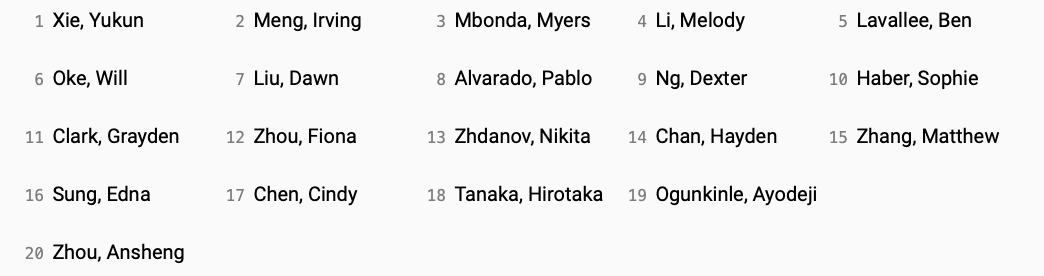
    • Here is the order of interviews for this morning:
      • Screenshot 2024-06-17 at 3.29.34 PM.png
    • Please wait on the bench outside room 36 when your interview is next.
      • For example, Irving will wait outside the room while Yukun completes his interview, and so on.
    • At some point this morning, please complete the course feedback form.
      • This form is anonymous.
      • Your constructive feedback is valued – thank-you in advance for your time with this.
    • By 12:30 PM (half past noon), be sure that you have finished filling in your Culminating Task portfolio entry – use this exemplar as a guide.
Important

Most of you will be dismissed at 11:30 AM. Please wait until I come out to dismiss you. Until then, to minimize traffic and noise in the academic block, please stay in Hadden Hall, with the exception of essential trips to the washroom.

Back to top of thread 4 ⬆

Thread 4, Day 14 - Monday, June 17, 2024

Agenda

  1. Culminating Task: End-of-year Interview Prep
Things to do before 9 PM
Things to do before tomorrow at 12:30 PM (Half Past Noon)

Back to top of thread 4 ⬆

Thread 4, Day 13 - Thursday, June 13, 2024

Agenda

  1. Culminating Task: Working Period
    • A gentle reminder that code for the culminating task must be committed and pushed by 10 PM tomorrow (Friday).
    • Continue the process of handing in your work
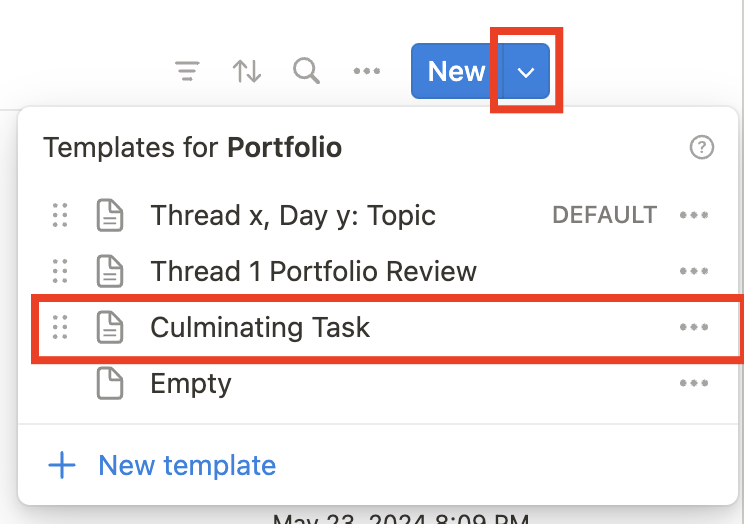
      • Make a post on Notion using the Culminating Task template, like this:
        Screenshot 2024-06-12 at 7.14.58 AM.png|200
        • Fill in the blanks that are provided.
        • Please, do not alter the template.
        • See this exemplar.
        Important

        Completing this entry in your portfolio is how your work will be handed in. This must be completed, in full, no later than 11 AM on the date of your end-of-year interview.

    • Continue building your culminating task app.
Things to do before our next class
    • Share your progress in one or more updates on Notion.

Back to top of thread 4 ⬆

Thread 4, Day 12 - Wednesday, June 12, 2024

Agenda

  1. Culminating Task: Working Period
    • Begin the process of handing in your work (new)
      • Make a post on Notion using the Culminating Task template, like this:
        Screenshot 2024-06-12 at 7.14.58 AM.png|200
        • Fill in the blanks that are provided.
        • Please, do not alter the template.
        • See this exemplar.
        Important

        Completing this entry in your portfolio is how your work will be handed in. This must be completed, in full, no later than 11 AM on the date of your end-of-year interview.

    • Continue building your culminating task app.
Things to do before our next class
    • Share your progress in one or more updates on Notion.

Back to top of thread 4 ⬆

Thread 4, Day 11 - Tuesday, June 11, 2024

Agenda

  1. Culminating Task: Working Period
Things to do before our next class
    • Share your progress in one or more updates on Notion.

Back to top of thread 4 ⬆

Thread 4, Day 10 - Friday, June 7, 2024

Agenda

  1. Culminating Task: Working Period
Things to do before our next class
    • Share your progress in one or more updates on Notion.

Back to top of thread 4 ⬆

Thread 4, Day 9 - Thursday, June 6, 2024

Agenda

  1. Culminating Task: Working Period
    • Use this period to continue building your culminating task app.
    • An exemplar app is being built by Mr. Gordon to help interested students review key concepts.
      Tip

      You are not required to watch this video end-to-end (or at all) but are more likely to, instead, choose to consult only certain chapters.

      For example, if your app includes an opening screen with a "Get Started" link you may wish to watch this chapter of the video.

      • If you are ready to start querying a database table joined to another database table – with either a one-to-many or a many-to-many relationship – review this example provided by the Supabase documentation team. Supabase automatically detects joined tables and makes writing queries against them much easier than they otherwise would be.
      Tip

      A more complete example of how to query joined tables is coming by tomorrow from Mr. Gordon.

Things to do before our next class
    • Share your progress in one or more updates on Notion.

Back to top of thread 4 ⬆

Thread 4, Day 8 - Tuesday, June 4, 2024

Agenda

  1. Culminating Task: Model Data
    • In today's class, you will learn what an entity-relationship diagram is, and take a stab at drawing one for your culminating task app.
      • Once you have:
        • drawn your ER diagram
        • used it to generate the SQL necessary to define and populate your database
        • posted all of this to your portfolio entry on Notion
      • ... you can use any remaining time to continue working on the static user interface for your culminating task app.
Things to do before our next class
    • Share your progress in one or more updates on Notion.

Back to top of thread 4 ⬆

Thread 4, Day 7 - Friday, May 31, 2024

Agenda

  1. Culminating Task: Create Static Interfaces
    • You have one more day to work on your static interfaces this week.
      • Use your Keynote prototypes as a reference.
      • Be sure to use SwiftUI Views Mastery as a reference while building out static interfaces.
      Tip

      If you prefer, rather than making a truly static interface (where data is embedded in views as string literals) you can can instead store data in arrays and apply abstraction (which makes building an app out easier).

      • Remember to use source control – commit and push your work frequently.
      Reminder

      Next week, with guidance from Mr. Gordon, you will design, create, and populate your app's database.

      Note that this step is necessary for completion of culminating tasks but database design and creation is not being evaluated.

      If you are ready now, see Mr. Gordon today in class, and he will give you the condensed version of the database design and creation lesson on the spot.

Things to do before our next class
    • Share your progress in one or more updates on Notion.

Back to top of thread 4 ⬆

Thread 4, Day 6 - Thursday, May 30, 2024

Agenda

  1. Culminating Task: Create Static Interfaces
    • Make a big push to score significant progress on your static interface today.
      • Use your Keynote prototypes as a reference.
      • Be sure to use SwiftUI Views Mastery as a reference while building out static interfaces.
      • Remember to use source control – commit and push your work frequently.
      Tip

      After your static interface is complete, the next step is to create and populate your database. A how-to guide on this topic is forthcoming.

      Note that this step is necessary for completion of culminating tasks but database design and creation is not being evaluated.

      If you are ready now, see Mr. Gordon today in class, and he will give you the condensed version of the database design and creation lesson on the spot.

Things to do before our next class
    • Share your progress in one or more updates on Notion.

Back to top of thread 4 ⬆

Thread 4, Day 5 - Wednesday, May 29, 2024

Agenda

  1. Optional Tutorial: Creating a To-do List App, Part 9
    • Learn how to add an image to a to-do item and persist that image using the Supabase service.
    Tip

    You do not need to complete this tutorial if you will not need to allow users to upload images within your culminating task app.

  2. Culminating Task: Create Static Interfaces
    • Making reference to your Keynote prototypes built in our prior mod, begin making static, non-interactive interfaces for your culminating task app.
      • Be sure to use SwiftUI Views Mastery as a reference while building out static interfaces.
      • Remember to use source control – commit and push your work frequently.
Things to do before our next class
    • Share your progress in one or more updates on Notion.

Back to top of thread 4 ⬆

Thread 4, Day 4 - Tuesday, May 28, 2024

Agenda

  1. Tutorial: Creating a To-do List App, Part 8
    • Add some refinements to the app, including the use of a slide-up sheet to show the user interface for adding a new to-do item.
    Tip

    In your culminating task app, if your users need to be able to create and save data within your app, then you should complete this tutorial today.

    Actually adding images will be covered in an optional tutorial made available in our next class.

  2. Culminating Task: Create Static Interfaces
    • Making reference to your Keynote prototypes built in our prior mod, begin making static, non-interactive interfaces for your culminating task app.
      • Be sure to use SwiftUI Views Mastery as a reference while building out static interfaces.
      • Remember to use source control – commit and push your work frequently.
Things to do before our next class
    • Share your progress in one or more updates on Notion.

Back to top of thread 4 ⬆

Thread 4, Day 3 - Friday, May 24, 2024

Agenda

  1. Working Period
    • This is an opportunity to get caught up, if necessary, on the to-do list tutorials connected to using a cloud-hosted database.
      • By our next class, please be sure you have completed these three parts:
        • Part 5
          • Initial set up of the cloud-hosted database.
          • Starting to learn about the MVVM design pattern.
        • Part 6
          • Authoring the view model to communicate with the database.
        • Part 7
          • Adding search.
          • Enabling row-level security.
    • If you are finished those tutorials, making reference to your Keynote prototypes built in our prior mod, begin making static, non-interactive interfaces for your culminating task app.
Things to do before our next class
    • Share your progress in one or more updates on Notion.

Back to top of thread 4 ⬆

Thread 4, Day 2 - Thursday, May 23, 2024

Agenda

  1. Tutorial: Creating a To-do List App, Part 7
    • Learn how to add search to the app, and how to set up security so that users cannot see each other's to-do items.
    Note

    If you haven't tried part 5 or part 6 of this series, please complete those in order before starting part 7.

Things to do before our next class
    • Share your progress in one or more updates on Notion.

Back to top of thread 4 ⬆

Thread 4, Day 1 - Tuesday, May 21, 2024

Agenda

  1. Tutorial: Creating a To-do List App, Part 6
    • Continue learning how to use Supabase to store data within a cloud-hosted database for your to-do list app.
    Note

    If you haven't tried part 5 of this tutorial series, please do that before starting part 6.

Things to do before our next class
    • Share your progress in one or more updates on Notion.

Back to top of thread 4 ⬆

Thread 3, Day 13 - Thursday, April 18, 2024

Agenda

  1. Working Period: Portfolio Clean-up
    • Add evidence for whatever might be missing from your portfolio for assigned tasks in this module.
    • Thinking back to your mid-module portfolio review, make a post for today's class identifying where you feel your current grade should land, based on the new evidence you have added since the mid-module reviews.
Things to do before Saturday at 10 PM

Back to top of thread 3 ⬆

Thread 3, Day 12 - Tuesday, April 16, 2024

Agenda

  1. Concept: Usability Testing
  2. Activity: Usability Café
    • Conduct usability tests with your assigned group of peers.
    • Complete at least three interviews.
    • For each person who you interview, complete this form.
  3. Working Period: App Prototype Revisions
    • You have the remainder of this period to make revisions to your app prototype in Keynote, based on the feedback you have received.
Things to do before our next class
    • Please be sure to share the revised Keynote file on Notion.

Back to top of thread 3 ⬆

Thread 3, Day 11 - Monday, April 15, 2024

Agenda

  1. Activity: Making a Prototype of Your App
    • If you have not yet, finish making a prototype of your app in Keynote.
    • This is needed so that you can demo your app to a peer in class tomorrow, and receive feedback.
    • This is hard deadline.
  2. Tutorial: Creating a To-do List App, Part 5
    • Begin learning how to use Supabase to store data within a cloud-hosted database for your to-do list app.
Things to do before our next class

Back to top of thread 3 ⬆

Thread 3, Day 10 - Saturday, April 13, 2024

Agenda

  1. Activity: Making a Prototype of Your App
  2. Portfolios: Mid-module Portfolio Reviews
    • Significant areas we have addressed:
      • Brainstorm app ideas and audiences
      • How to query a database
      • How to persist data within an app
    • Meet privately with Mr. Gordon informally review your portfolio and propose a current level of achievement.
Things to do before our next class
    • Share your progress in one or more updates on Notion.

Back to top of thread 3 ⬆

Thread 3, Day 9 - Friday, April 12, 2024

Agenda

  1. Tutorial: Creating a To-do List App, Part 4
    • Learn how to use in-memory containers for Xcode Previews when working with the SwiftData framework.
  2. Activity: 60 Second Prototyping
    • Watch this 10-minute video to get a better understanding of how building quick prototypes can save you time when refining plans for an app.
  3. Setup: Keynote
    • Install the latest version of Keynote on your computer.
    • You may first need to delete any existing copy of Keynote on your computer – please check your Applications folder.
    • In our next class, Mr. Gordon will show you how to get started with using Keynote to build an interactive prototype of your app.
  4. Activity: Making a Prototype of Your App
Note

The tutorial on how to build a version of the to-do list app that uses a cloud-hosted database has been deferred to a future class, so that you can have the weekend to begin working on your app prototype in Keynote.

Things to do before our next class
    • Then share your progress in one or more updates on Notion.

Back to top of thread 3 ⬆

Thread 3, Day 8 - Tuesday, April 9, 2024

Agenda

  1. Tutorial: Creating a To-do List App, Part 3
    • Persist data created in the app to a database stored locally on the device.
Things to do before our next class
    • Then share your progress in one or more updates on Notion.

Back to top of thread 3 ⬆

Thread 3, Day 7 - Monday, April 8, 2024

Agenda

  1. Tutorial: Creating a To-do List App, Part 2
    • Create a working user interface for a to-do list app, with the ability to create, delete, and toggle to-do items.
Things to do before our next class
    • Then share your progress in one or more updates on Notion.

Back to top of thread 3 ⬆

Thread 3, Day 6 - Friday, April 5, 2024

Agenda

  1. Concept: Structures vs. Classes

    • Take your time reading through this lesson.
    • Make notes regarding your observations.
    • Then draw conclusions when prompted to understand how classes are handled differently from structures in the Swift programming language.
    • You are welcome to work through the playground and discuss ideas with a partner, but you please make your own notes – the process of thinking about what you are seeing, and then considering how to explain that in writing, is a big part of building your long-term memories.
    Important

    Share your notes in a portfolio post on Notion; Mr. Gordon will provide feedback.

  2. Tutorial: Creating a To-do List App

    • Create a static user interface for a to-do list app.
Things to do before our next class
    • Then share your progress in one or more updates on Notion.

Back to top of thread 3 ⬆

Thread 3, Day 5 - Wednesday, April 3, 2024

Agenda

  1. Querying a Database - Consolidation
    • Review key concepts for querying databases.
    • Check your understanding by completing at least some of the exercises provided.
    Note

    Here is a video from the other section of Gr. 11 Intro to Computer Science where some tips about how to organize queries were given.

    This might be worth reviewing, especially before trying the more challenging queries from the exercises given on this day.

Things to do before our next class

Back to top of thread 3 ⬆

Thread 3, Day 4 - Tuesday, April 2, 2024

Agenda

  1. Databases: Check Your Understanding
    • If you have not yet, first, please make a post on Notion regarding your progress on the Introduction to Databases task.
      • Almost every application you will write will have a database in use behind the scenes.
    • Once Mr. Gordon has your post, you can check your work against the solutions – all of which include commentary to explain how they work.
    Note

    Please do not hesitate to ask Mr. Gordon clarifying questions when checking your solutions.

  2. Joining Tables in a Database
    • What happens when we want to write a query that needs columns from multiple tables in a database?
    • Learn how to join tables, and complete the provided exercises.
Things to do before our next class

Back to top of thread 3 ⬆

Thread 3, Day 3 - Thursday, March 7, 2024

Agenda

  1. Activity: App Design Journal
    • If you have not yet, finish the Brainstorm (green) section.
  2. Concept: Introduction to Databases
    • How can information be organized within an app, beyond a simple list?
    • Almost every application you use has a database behind it.
    • Read on to learn what a database is and how to query it (obtain information) from it.
    Note

    If you have finished the App Design Journal, start on, or continue with, this activity.

    When you are finished (or have gotten as far as you can) share your progress on Notion. Once you have done so, Mr. Gordon will send you a link to the solutions, and you can check your work.

Things to do before the end of class
Vacation

Have a restful, fun, and safe March Break! 😎 See you in April! 🌷

Back to top of thread 3 ⬆

Thread 3, Day 2 - Tuesday, March 5, 2024

Agenda

  1. Video: New Beginnings
    • What problems are being solved by developers in this video?
  2. Activity: App Design Journal
    • Continue working through the Brainstorm (green) section of this document.
    • Aim to complete the green section before you leave for March Break.
    Tip

    Edits during March Break are totally fine, but not required! Sometimes in a new setting (at home with family, out with friends) we get new ideas for a useful app...

  3. Concept: Introduction to Databases
    • How can information be organized within an app, beyond a simple list?
    • Almost every application you use has a database behind it.
    • Read on to learn what a database is and how to query it (obtain information) from it.
    Note

    Please only work on this lesson after you have fully filled in the Brainstorm (green) section of your App Design Journal.

Things to do before our next class
    • There is no need to work on item 3 outside of class time.

Back to top of thread 3 ⬆

Thread 3, Day 1 - Monday, March 4, 2024

Agenda

  1. Video: Source Code

    • What makes a developer a developer?
      • A video where developer's families describe what they see.
    • Please look past the cringe stereotypes at the start of the video...
      • In fact, not all developers want to stay inside at the holidays
      • "Weird eyes?!"
    • What do you hear that's notable in this video?
  2. Activity: App Design Journal

    • Your learning path through the course is about to go like this: ⑃
    • That is, when we come back from March Break, it's definitely the case that each of you will be learning different things to bring the app you want to make to life.
    • What do you want to make? Let's discuss...
    • The goal is to really think about ideas, opportunities, problems, or challenges... please engage with and complete slides two through five.
    Tip

    There will be lots of conversation in this class! Feel free to bounce ideas off of peers, Mr. Gordon... you took this course to learn how to build something, right? Let's dive in to your ideas...

Things to do before our next class

Back to top of thread 3 ⬆

Thread 2, Day 12 - Friday, February 2, 2024

Agenda

  1. Concept: Handling Bad User Input
    • Learn how to apply your understanding of optionals to handle situations where the user provides unexpected input.
  2. Tutorial: Animations
    • Learn how to add animations to your apps.
      • If you did not have time to try this tutorial earlier in the week, give it a try troday.
Reminder

Today is the last day of the current module.

You may work on your portfolio up until Saturday at 11 PM to fill in any gaps that currently exist.

For Evening Study

Back to top of thread 2 ⬆

Thread 2, Day 11 - Tuesday, January 30, 2024

Agenda

  1. Concept: Dynamic Lists and Selection Statements
    • Learn how to change the contents of an array while a program is being run.
    • Understand how selection statements can be used to add logic to an app so that it accomplishes a desired goal – in this case, a guessing game.
  2. Tutorial: Animations
    • Learn how to add animations to your apps.
    Note

    Please complete this tutorial only after completing the lesson above, it's exercises, and authoring a post in your portfolio on Notion.

For Evening Study

Back to top of thread 2 ⬆

Thread 2, Day 10 - Monday, January 29, 2024

Agenda

  1. Concept: Abstraction Using Lists
    • A recap of all the big ideas you learned last week.
For Evening Study
    • Be sure to provide visual evidence of having completed the exercises (such as screenshots or short videos).

Back to top of thread 2 ⬆

Thread 2, Day 9 - Friday, January 26, 2024

Agenda

  1. Concept: Lists
    • How to store and use multiple pieces of data in an app by referring to just a single name.
    • Please read this lesson for understanding, not speed of completion.
    • Take notes for key terms that are italicized using whatever medium (paper, Notion post) you prefer.
    • Be sure to complete the exercises as you go.
For Evening Study
    • Be sure to provide visual evidence of having completed the exercises (such as screenshots or short videos).

Back to top of thread 2 ⬆

Thread 2, Day 8 - Tuesday, January 23, 2024

Agenda

  1. Task: Trading Cards

    • Use today's class to complete, or improve and extend, your trading card interface.
    Tip

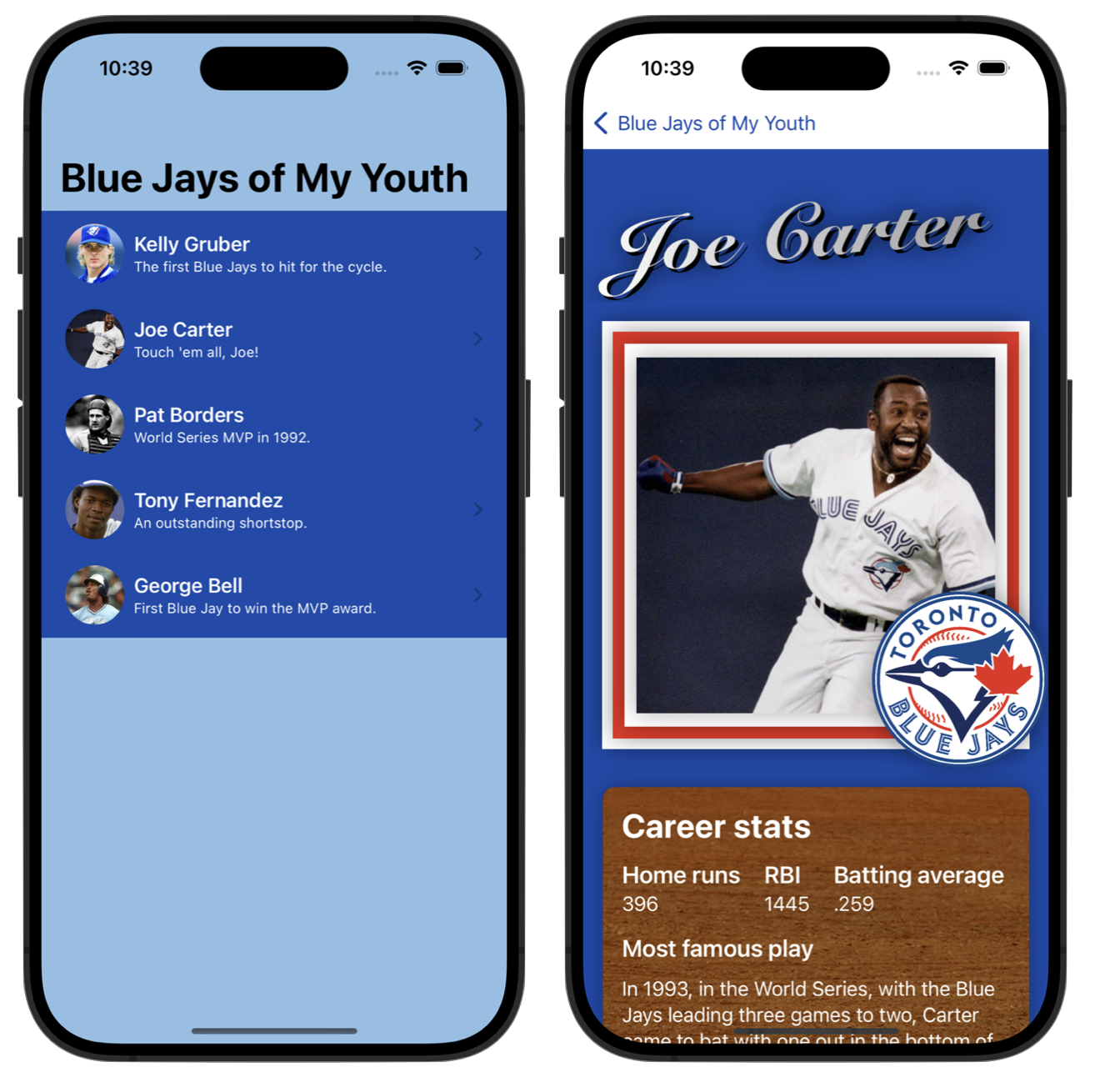
    Mr. Gordon has "dog-fooded" this suggestion already and here is what he came up with to improve his own Trading Cards:

    Screenshot 2024-01-23 at 10.43.26 AM.png|600

For Evening Study

Back to top of thread 2 ⬆

Thread 2, Day 7 - Monday, January 22, 2024

Agenda

  1. Task: Trading Cards
    • You can clone this repository to see some useful examples and tips.
      • Choose Integrate > Clone... in Xcode, paste in the repository address, then choose a location to store the project on your computer.
For Evening Study

Back to top of thread 2 ⬆

Thread 2, Day 6 - Friday, January 19, 2024

Agenda

  1. Task: Trading Cards
    • Carefully review the expectations for this assignment.
    • Don't fall in to the trap...
For Evening Study and The Weekend

Back to top of thread 2 ⬆

Thread 2, Day 5 - Tuesday, January 16, 2024

Agenda

  1. Concept: Introduction to Interactive Apps
  2. Concept: Separation of Concerns
    • Learn how to leverage existing code you have already written to write an interactive app.
    • Learn how to keep user interface code (the view) separate from data and logic (the model).
  3. Tutorial: Develop in Swift Tutorials
    • Chapters 1, 2, and 3 cover concepts that are largely review but still good practice.
    • Chapters 4 and 5 get into topics that we will learn about in this module, and can be completed as a preview of topics that Mr. Gordon will author separate lessons for later in this module.
Important

There is far too much content listed today to complete in a single class.

Continue with the items listed in order, where you left off from yesterday's class.

For Evening Study
    • Mr. Gordon is still not well enough to be at school but will make an effort to send some replies and feedback through Notion.

Back to top of thread 2 ⬆

Thread 2, Day 4 - Monday, January 15, 2024

Agenda

  1. Concept: Introduction to Interactive Apps
  2. Concept: Separation of Concerns
    • Learn how to leverage existing code you have already written to write an interactive app.
    • Learn how to keep user interface code (the view) separate from data and logic (the model).
  3. Tutorial: Develop in Swift Tutorials
    • Chapters 1, 2, and 3 cover concepts that are largely review but still good practice.
    • Chapters 4 and 5 get into topics that we will learn about in this module, and can be completed as a preview of topics that Mr. Gordon will author separate lessons for later in this module.
Important

There is far too much content listed today to complete in a single class.

While Mr. Gordon is away with illness, use each class to make progress based on where you are, personally, with your learning. Some students have already completed items 1 and 2 above, so they should work on item 3. Some students have not completed any of these items, so they should begin with item 1.

For Evening Study
    • Mr. Gordon is not well enough to be at school but will make an effort to send some replies and feedback through Notion.

Back to top of thread 2 ⬆

Thread 2, Day 3 - Friday, January 12, 2024

Agenda

  1. Discussion: Gradients
    • A brief look at how to create interesting gradients.
    Tip

    Here is the video from our discussion of this topic in class today – useful for review, or if you were absent.

  2. Activity: Optionals
    • Understand how the Swift programming language handles cases where a value may not exist for a variable or constant.
  3. Recap: Develop in Swift Tutorials
    • A further opportunity to consolidate concepts learned in module 1, and to learn a few new ways to write apps using the features of Xcode.
    • Chapters 1, 2, and 3 are all good choices to try this week.
      Note

      Mr. Gordon was an unpaid technical reviewer for these tutorials; they were authored by a team at Apple.

Things to do before our next class

Back to top of thread 2 ⬆

Thread 2, Day 2 - Wednesday, January 10, 2024

Agenda

  1. Setup: GIF Scrubber
    • Optionally, install this browser extension for Chrome or Firefox.
    • This allows you to pause, rewind, or fast-forward an animated GIF.
  2. Activity: Optionals
    • Understand how the Swift programming language handles cases where a value may not exist for a variable or constant.
  3. Recap: Develop in Swift Tutorials
    • A further opportunity to consolidate concepts learned in module 1, and to learn a few new ways to write apps using the features of Xcode.
    • Chapters 1, 2, and 3 are all good choices to try this week.
      Note

      Mr. Gordon was an unpaid technical reviewer for these tutorials; they were authored by a team at Apple.

Things to do before our next class

Back to top of thread 2 ⬆

Thread 2, Day 1 - Tuesday, January 9, 2024

Agenda

  1. Setup: Update Xcode and Simulators
    • A key bug that impacts battery life has reportedly been resolved in the latest version of Xcode.
    • Be sure to complete this update.
  2. Activity: Thread 1 Recap
    • Describing data and user interfaces using structures... all the big ideas summarized along with several exercises to get your 🧠 moving again! 🚀
Things to do before our next class

Back to top of thread 2 ⬆

Thread 1, Day 16 - Friday, November 17, 2023

Agenda

  1. Portfolio: Connecting Learning Goals to Tasks
    • A conversation about what tasks we have done fit with a given learning goal.
  2. Portfolio: Authoring Your Portfolio Review
    • Using the template provided in Notion.
    • How to link to existing pages within your portfolio.
    • Arranging two Notion windows to make authoring a review easier.
Things to do before saturday at 10 PM

Back to top of thread 1 ⬆

Thread 1, Day 15 - Thursday, November 16, 2023

Agenda

  1. Concept: Separation of Concerns
    • Learn how to leverage existing code you have already written to write an interactive app.
    • Learn how to keep user interface code (the view) separate from data and logic (the model).
Things to do before our next class

Back to top of thread 1 ⬆

Thread 1, Day 14 - Wednesday, November 15, 2023

Agenda

  1. Concept: Introduction to Interactive Apps
Things to do before our next class

Back to top of thread 1 ⬆

Thread 1, Day 13 - Wednesday, November 8, 2023

Agenda

  1. Working Period: Make Progress on Current Tasks
Things to do before our next class

Back to top of thread 1 ⬆

Thread 1, Day 12 - Monday, November 6, 2023

Agenda

  1. Tutorial: Running Your Code
    • When should you run code in the Previews window and when should you run it in the full Simulator app or on a physical device?
  2. Tutorial: Adding a Physical Device as a Run Destination
    • Learn how to test your apps on an iPhone or iPad.
    Note

    If you have an Intel Mac, testing your app on a physical device may be much faster than using Previews or the Simulator.

    You can check what type of chip is in your Mac by using the menu sequence  > About This Mac...

  3. Working Period
    • Complete tasks in this order:
      • Stopwatch tutorials
      • Reminders activity described on Day 10
      • Reproduce an Interface
        • Check in with Mr. Gordon in-person to see the interface you should reproduce.
  4. Setup: Font Browser
    Note

    This will download a Zip file; you can open the Xcode project using the same steps as described at the start of the Running Your Code tutorial.

Things to do before our next class
Note

Remember to share progress in your portfolio on Notion.

Back to top of thread 1 ⬆

Thread 1, Day 11 - Saturday, November 4, 2023

Agenda

  1. Tutorial: Pushing Commits to GitHub
  2. Working Period
    • Use today's class to work on the Stopwatch activity and then the Reminders activity described on Day 10.
  3. Task: Reproduce an Interface
    • Start this task after completing the activities mentioned above.
Things to do before our next class

Back to top of thread 1 ⬆

Thread 1, Day 10 - Friday, November 3, 2023

Agenda

  1. Setup: Connecting Xcode to GitHub
    • Please follow this link to create a new access token so that Xcode can push your commits to a remote on GitHub.
    • Mr. Gordon will provide remaining instructions.
  2. Activity: Modelling a Book Listing
    Note

    You can write down your rough ideas on the hard copies of this example that are being handed out.

  3. Activity: Reproducing the Stopwatch
    • Learn how to reproduce the interface of a real iOS app.
    Note

    Aim to finish this activity today if you have not done so yet.

  4. Activity: Reminders App
    • Create a new project for iOS named Reminders App.
    • Work alone or with a partner to analyze this interface and then apply what you learned from reproducing the Stopwatch app to reproduce this interface.
    • Focus on the main portion of the interface at first – that is, the list.
    • Then, use SwiftUI Views Mastery, and look up the NavigationStack structure (pages 313 to 321) for examples of how to add:
      • a navigation title
      • toolbar items (also see pages 681 to 684)
        Tip

        Do not worry about items like the battery icon, WiFi status, or cellular network – these are provided in a real app by the operating system and you do not have to worry about adding these to an interface as an app developer.

Things to do before our next class

Back to top of thread 1 ⬆

Thread 1, Day 9 - Thursday, November 2, 2023

Agenda

  1. Activity: Reproducing the Stopwatch
    • Learn how to reproduce the interface of a real iOS app.
  2. Portfolios: Mid-module Portfolio Reviews
    • Major skills learned to date:
      • authoring structures to model data
      • creating user interfaces
    • Meet privately with Mr. Gordon to review your portfolio and propose a current level of achievement for the skills list above, based on the evidence currently in your portfolio.
Things to do before our next class

Back to top of thread 1 ⬆

Thread 1, Day 8 - Monday, October 30, 2023

Agenda

  1. Setup: Create a GitHub Account
  2. Activity: Create a "Bento-Box" Design
    • Reviewing some strategies to help complete the exercise assigned in our last class.
    • Time to work on this task in class, as needed.
  3. Activity: Reproducing the Stopwatch
    • Learn how to reproduce the interface of a real iOS app.
Things to do before our next class
    • We will be doing mid-module portfolio reviews early next week.
    • You will have a short private conversation with Mr. Gordon, and:
      • describe what you have done well by using the evidence in your portfolio
      • identify what you might do to improve
      • categorize your current level of achievement as one of these levels:
        • approaching expectations
        • meeting expectations
        • exceeding expectations

Back to top of thread 1 ⬆

Thread 1, Day 7 - Friday, October 27, 2023

Agenda

  1. Productivity: Negative app
    • Dark mode makes using most parts of our computers comfortable after sundown.
    • PDFs have long been a problem – they still show with a white background.
    • Negative solves this – optionally, try it out.
  2. Discussion: Rubber Duck Debugging
    • Solving logical errors and syntax errors can be frustrating, but everyone deals with it, even experienced programmers.
    • Pairing with a friend to describe what you are trying to do with your code, line by line, can be helpful.
      • Often during this process, you will realize the source of the problem you are having.
    • When a friend is not nearby, use your duck! 🦆
  3. Setup: SF Symbols App
    • Not all software developers have graphic design skills.
    • Platform owners like Apple want their users to have a consistent experience when using apps written by different people.
    • One of the ways Apple helps their developers provide that consistent look and feel is by offering a wide variety of built-in images that can be used in apps.
    • Please download and install the SF Symbols app now.
      Tip

      To use an SF Symbol within a SwiftUI layout, try the following code:

        Image(systemName: "bolt")
            .resizable()
            .scaledToFit()
            .frame(width: 20)
      
  4. Setup: Creating a New macOS Project with a GUI
    • Please follow these steps to create a new project for the Bento-Box exercise below.
  5. Tutorial: Saving Revisions of Your Work
    • Xcode automatically saves your code as you type.
    • However, it is additionally useful to have "save points" while you author code.
    • Mr. Gordon will explain how to stage and commit your work to save revisions locally.
      Important

      As you go forward in this course, always commit your work frequently with descriptive messages.

      This serves as a form of note-taking, makes it easier to debug problems, and if necessary, makes it possible for you to return to a prior version of your code.

  6. Exercise: Create a "Bento-Box" Design
    • Marketing teams must be able to convey new features in a concise manner to an audience.
    • In recent years, Apple has used "Bento-Box" graphics to do so.
    • Try to reproduce this image using SwiftUI, or use it as inspiration to design a bento-box themed view related to something you care about.
    • Mr. Gordon will demonstrate how to add images into your project.
    • Use SwiftUI Views Mastery as a reference.
    • Here is the starter code discussed in class and a screenshot of what it looks like.
      Hint

      Some keywords to look for examples of:

      • foregroundStyle
      • cornerRadius
      • gradient
      • Image

      Also: the keyboard shortcut Option-Shift-K produces the Apple logo.

Things to do before our next class
    • We will be doing mid-module portfolio reviews early next week.
    • You will have a short private conversation with Mr. Gordon, and:
      • describe what you have done well by using the evidence in your portfolio
      • identify what you might do to improve
      • categorize your current level of achievement as one of these levels:
        • approaching expectations
        • meeting expectations
        • exceeding expectations

Back to top of thread 1 ⬆

Thread 1, Day 6 - Thursday, October 26, 2023

Agenda

  1. Exercise: Create More Wireframe Layouts
Things to do before our next class

Back to top of thread 1 ⬆

Thread 1, Day 5 - Wednesday, October 25, 2023

Agenda

  1. Activity: Modelling a Report Card
  2. Setup: Obtain Digital Copies of Your Books
    • Follow the instructions given in class to obtain your digital copies of SwiftUI Views Mastery and Working with Data in SwiftUI.
  3. Setup: Get the iOS Simulator
    • For future classes, this will be needed.
    • We will download it today.
  4. Concept: Introduction to Layout
    • Learn how to create basic page layouts in SwiftUI.
    • Recommend that you use this playground to make your wireframes.
    • Please continue to use screenshots to show the results of code being run.
  5. Exercise: Create a Wireframe Layout
    • Select at least two layouts from these examples.
    • Use the same concepts we have just looked at to wireframe the layouts you selected.
Things to do before our next class

Back to top of thread 1 ⬆

Thread 1, Day 4 - Monday, October 23, 2023

Agenda

  1. Discussion: Don't Repeat Yourself
    • How to keep your code tidy.
    • Capitalization conventions when authoring Swift code.
    • Vocabulary review.
    • Reviewing various solutions to the exercise from yesterday's class.
  2. Portfolio: Sharing Long Blocks of Code
    • Share code, not screenshots of code.
    • Please continue to use screenshots to show the results of code being run.
  3. Portfolio: Handling Comments on Posts
    • Do not mark comments as resolved in Notion so that the record of our conversation is preserved and easy to see at a glance.
  4. Concept: Computed Properties
    • Structures can do more than just store values - they can calculate values as well.
    Tip

    Here is the code we developed and discussed in class, and here is a screenshot showing the results when the code is run.

  5. Exercise: Describing 2D and 3D Figures
    • You have been randomly assigned a 2D or 3D figure to work with.
    • Create a new Xcode playground named Computed Properties Exercise.
    • Write a structure that models the figure you have been assigned.
      • The structure should use stored properties and computed properties.
    • Make several instances of the structure and test your work.
Things to do before our next class

Back to top of thread 1 ⬆

Thread 1, Day 3 - Saturday, October 21, 2023

Agenda

  1. Concept: Abstraction and Binary Numbers
    • Read this mini-lesson to get a very brief introduction to how computers store numeric data.
  2. Tutorial: Creating an Xcode Playground
    • Please follow the steps described in this tutorial to create a playground named Data Types and Structures.
  3. Concept: Data Types
    • Use the playground you just created to try out the examples given in this mini-lesson.
    • Take notes in your black hardcover notebook, or in your portfolio entry for today in Notion.
  4. Concept: Structures
    • Try out the examples described in this mini-lesson in the same playground you already have open.
  5. Exercise: Model Hockey Cards Data Using Structures
Things to do before our next class

Back to top of thread 1 ⬆

Thread 1, Day 2 - Friday, October 20, 2023

Agenda

  1. Portfolio: Creating a Notion Account
    • Get started with using Notion.
  2. Tutorial: Creating Bookmarks
    • Please be sure you make a bookmark for your Notion portfolio page.
  3. Portfolio: First Post
    • Learn more about what makes for good evidence of understanding when posting in your portfolio.
  4. Install Xcodes
    • Xcodes makes it easy to manage the installation of Xcode, which is the programming environment we will use this year.
      Note

      Check your email for an invitation to join the Apple Developer program via Lakefield College School.

      Please create a new Apple ID using your LCS email address to accept the invitation.

      When creating your Apple ID, use the school's street address, but your own phone number. The complete address for LCS is:

      4391 County Road 29
      Lakefield College School
      Lakefield ON K0L2H0
      Canada

  5. Install Xcode 15
    • Use Xcodes to install Xcode 15.
      Tip

      Do not install Xcode via the App Store, as using this method means that it will automatically get upgraded when a new version is released (which is not always ideal).
  6. Programming with Purpose
    • Please watch the video and respond to the prompts provided.
Things to do before our next class

Back to top of thread 1 ⬆

Thread 1, Day 1 - Thursday, October 19, 2023

Agenda

  1. Computer Studies at LCS
    • Ultimately, Computer Studies is about talking to people to understand problems that you can help them solve using technology.
  2. Course Outline
  3. Activity: Parsing Instructions
  4. Setup: Installing Playgrounds
  5. Setup: Subscribe to Turtle Sketches
  6. Activity: Name Plate
Things to do before our next class

Back to top of thread 1 ⬆